October 9, 2026
By Rogelio Zamora Jr | .Enterface, LLC
Running a Food Truck Requires Much Effort
Perhaps the most involved part is everything beyond cooking and serving the community. Things like posting where you'll be this week, updating the menu with new entrees, scheduling big events, budgeting, and doing it all again next week.
We think vendors deserve something better from us to help with their workflows...
Our Solution, the Vendors Portal
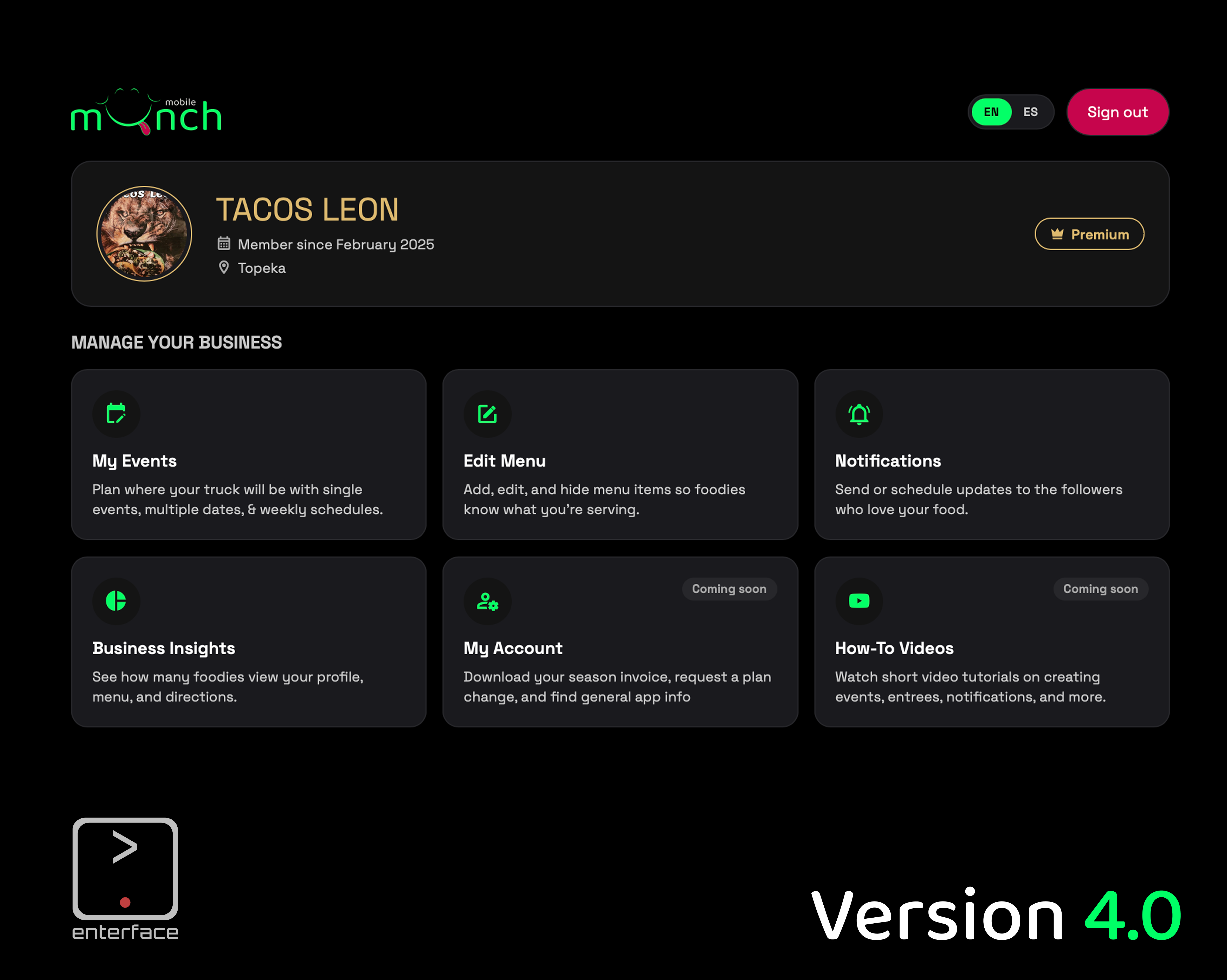
The mobile Munch Vendor Portal gives vendors a desktop home for their business. Sign in with the same account you already use in the mobile Munch app, and everything you change shows up for foodies right away.
It doesn't replace the app. Quick changes on the go still belong on your phone. The portal is for the bigger jobs, like planning your month, rebuilding your menu, or checking how your week went, when a keyboard and a bigger screen make life easier.
Here's what's inside:
-
Dashboard. Everything starts here. You see your truck, your plan, and one-click links to every area. If your profile isn't live yet, a banner tells you so you're never guessing.
-
My Events. Add one stop, pick up to 31 dates at once, or copy last week to this week. Save your regular locations as Spots so you never retype an address. Got the same routine every week? Set up a Weekly Schedule once and publish 1–4 weeks at a time. Taking a day off? Skip it without breaking the pattern. Selling out early? Hit End now and foodies know you're done for the day.
-
Calendar import. Already keep your truck's days in Google Calendar, Apple Calendar, or Outlook? Export the file, upload it, review your stops, and publish them.
-
Share My Week. Your next 7 days turn into a ready-to-post schedule, grouped by day with locations and times. Pick your own emoji and sign-off, copy it, and paste it wherever your customers already follow you.
-
Edit Menu. Add, edit, and remove items with prices, descriptions, options, and food tags that help foodies find you by craving. Use Sold Out / Hide to pull an item instantly and bring it back with one click. Premium vendors can add food photos, and the portal crops and sizes them for you.
-
Notifications. Send your followers a heads-up now, or schedule one up to 30 days ahead while you're planning your week. Built-in limits (1 a day, 3 a week) keep every message worth opening.
-
Business Insights. See how many foodies viewed your profile and menu, asked for directions, and followed you. Find out which dishes get the most attention and where people found you.
-
My Account. Download your season invoice, request a plan change or a food photoshoot, and find the fine print, all in one spot.
-
How-To Videos. Short walkthroughs for each task, so you or your crew can learn at your own pace.
And all of it works in English and Spanish. Switch with one tap.
Why Build This?
Vendors kept telling us the same thing: "I love the app, but sometimes its difficult to do everything on a small screen."
We learned that vendors take time weekly to map out their entire food truck week, if not month. Typing five addresses, five start times, and five end times on a phone isn't hard, but it's extremely tedious. And tedious work often gets skipped... We completely understand!
When schedules get skipped on the app, foodies can't visit. And nobody wins.
So we built the portal around one idea: make the right thing the easy thing. If working on a bigger screen improves the app's management experience by reducing extra work, then it was a no brainer for use to create this much needed solution. The benefits, more vendors save time and provide accurate information. Accurate info is what ensures that the apps purpose is meeting demand all around.
We're Not Trying to Be Facebook
Let's be clear about something.
mobile Munch isn't trying to replace Facebook, Instagram, or wherever else your customers follow you. Those communities are real, and you built them. We're not asking you to leave.
What we can do is make posting there easier.
Here's how it fits together:
- You enter your week once in mobile Munch.
- Foodies can find you in the app's discovery screens and calendar.
- Your followers get a notification when you want them to.
- Share My Week hands you a clean post for your social pages.
- Business Insights shows you what worked.
One entry, many places. No copying the same info into four different apps, and no wondering which version is right. There's one source of truth, and everything else flows from it.
The time you save stays with you, the person who actually has to cook the food.
The Bigger Picture
mobile Munch has always had a simple goal:
Discover something delicious. Find where it is. Know what they sell. Go support the local food truck.
Every one of those steps depends on vendors. Foodies can only discover what's listed, find what's scheduled, and order what's on the menu.
The Vendor Portal is how we make that side easier, so Topeka's food trucks spend less time managing information and more time doing what they love. When vendors have an easier time, foodies eat better. That's the whole idea.
What's Next
We're still filling out the How-To Videos library with fresh recordings for the new version, including Spanish versions. We'll keep improving the portal based on what vendors tell us they need, so keep the feedback coming.
Come Take a Look
Vendors: sign in at mobilemunch.app with your mobile Munch account and look around. Plan next week, tidy up your menu, and tell us what you think.
Not on mobile Munch yet? Reach out. We'd love to feature your business.
Foodies: keep doing what you do. Open the app, find something delicious, and go support a local food truck. Those schedules just got a lot more reliable.
Until Next Time,
~ .Enterface Team